Inline Preview for Source File Links in Emacs
While working, I constantly take notes using org-mode. Because I often work with code, I extensively use the ability of org-mode to link directly into code files when I need to reference where something can be found.
Something like [[file:~/src/foo/bar.el::42][the bit that parses the header]]. I can easily follow this link and have the file open in emacs, but in the note itself the link is just some underlined text. To remind myself what is behind the link I have to jump there, look, and jump back. That gets annoying.
What I really wanted was for org to show me the relevant lines right below the link, the way it already inlines images. Here is what the same link looks like before and after:

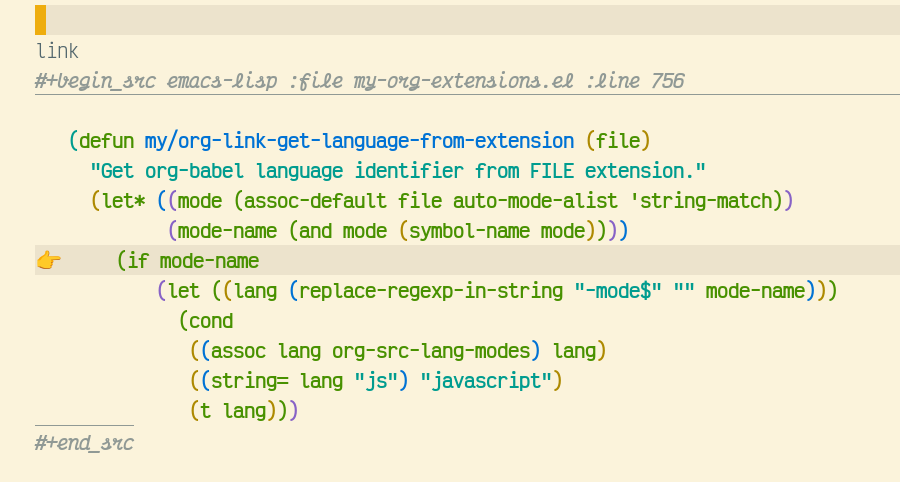
The hook org already gives us
Org 9.7 ships org-link-preview natively, but out of the box it only knows
how to preview images. The good news is that the mechanism is generic: every
link type can register a :preview function via org-link-set-parameters,
and org will call it with an overlay it has already placed on top of the
link. Whatever the function puts on that overlay is what the user sees.
That is the entire trick. The rest of this post is just filling in the
preview function for file: and attachment: links so that, when the link
points at a specific line, we render a syntax-highlighted snippet around it.
Resolving the link to a snippet
A file link in org can carry a search option after ::. It can be a line
number (foo.el::42) or a piece of text (foo.el::defun my-thing) — org
uses it when following the link to jump to the right spot, and we want to
use it as the anchor for the preview.
The helpers below do four things: turn a text search into a line number, guess the source-block language from the file extension (so the snippet gets the right fontification when re-inserted), apply font-lock to the extracted text, and finally format the result with a 👉 marker on the target line so it’s obvious which line the link actually points at.
(defcustom my/org-link-preview-context-lines 5
  "Number of context lines to show before and after target line."
  :type 'integer
  :group 'org-link)

(defun my/org-link-find-line-by-text (file search-text)
  "Find line number in FILE that contains SEARCH-TEXT.
Returns line number or nil if not found."
  (when (and file (file-exists-p file) search-text)
    (with-temp-buffer
      (insert-file-contents file)
      (goto-char (point-min))
      (when (search-forward search-text nil t)
        (line-number-at-pos)))))

(defun my/org-link-get-language-from-extension (file)
  "Get org-babel language identifier from FILE extension."
  (let* ((mode (assoc-default file auto-mode-alist 'string-match))
         (mode-name (and mode (symbol-name mode))))
    (if mode-name
        (let ((lang (replace-regexp-in-string "-mode$" "" mode-name)))
          (cond
           ((assoc lang org-src-lang-modes) lang)
           ((string= lang "js") "javascript")
           (t lang)))
      (or (file-name-extension file) "text"))))

(defun my/org-link-apply-syntax-highlighting (content file)
  "Apply syntax highlighting to CONTENT based on FILE's major mode."
  (with-temp-buffer
    (insert content)
    (let ((mode (assoc-default file auto-mode-alist 'string-match)))
      (when (and mode (fboundp mode))
        (ignore-errors
          (funcall mode)
          (font-lock-ensure))))
    (buffer-string)))

(defun my/org-link-format-preview-content (content start-line target-line)
  "Format CONTENT as preview with optional TARGET-LINE highlighting."
  (with-temp-buffer
    (insert content)
    (goto-char (point-min))
    (let ((current-line start-line)
          (result ""))
      (while (not (eobp))
        (let* ((line-text (buffer-substring (point) (line-end-position)))
               (is-target (and target-line (= current-line target-line))))
          (setq result
                (concat result
                        (if is-target
                            (propertize (concat "👉 " line-text "\n") 'face 'hl-line)
                          (concat "   " line-text "\n"))))
          (setq current-line (1+ current-line))
          (forward-line 1)))
      result)))

(defun my/org-link-get-file-preview (file target-line)
  "Get preview text for FILE centered around TARGET-LINE.
Returns propertized string formatted as an org source block, or nil."
  (when (and file (file-exists-p file) target-line)
    (with-temp-buffer
      (insert-file-contents file)
      (let* ((language (my/org-link-get-language-from-extension file))
             (start-line (max 1 (- target-line my/org-link-preview-context-lines)))
             (end-line (+ target-line my/org-link-preview-context-lines)))
        (goto-char (point-min))
        (forward-line (1- start-line))
        (let* ((content-start (point))
               (content-end (progn (forward-line (- end-line start-line -1)) (point)))
               (content (buffer-substring content-start content-end))
               (highlighted (my/org-link-apply-syntax-highlighting content file))
               (formatted (my/org-link-format-preview-content
                           highlighted start-line target-line))
               (line-info (format " :file %s :line %d"
                                  (file-name-nondirectory file) target-line)))
          (concat (propertize (format "#+begin_src %s%s\n" language line-info)
                              'face 'org-block-begin-line)
                  formatted
                  (propertize "#+end_src" 'face 'org-block-end-line)))))))
There’s nothing clever in there — the only thing worth pointing at is that
the snippet is wrapped in a fake #+begin_src / #+end_src pair with the
filename and line baked into the header. That way the rendered overlay looks
exactly like a normal org source block, getting nice syntax highlighting in the process.
Wiring it into org-link-preview
A :preview function receives (OV PATH LINK). The contract is: configure
the overlay OV however you like and return non-nil to keep it, or return
nil to have org throw the overlay away. We render the snippet via
after-string so it appears below the link instead of replacing it —
keeping the original link visible matters, because there might also be
information in the link description.
The function only kicks in when the link has a search option. If there
isn’t one, there’s nothing to anchor the preview to, so we fall through to
org’s built-in image previewer. That way PNGs and friends still inline as
before, and we register the same dispatcher for both file: and
attachment: links so org-attach works too.
(defun my/org-link-preview-source-file (ov path link)
  "Preview a source-file link as a snippet over overlay OV.
Handles file links with a numeric (::42) or text (::needle) search
option. Returns non-nil on success, nil to let org fall back."
  (let ((search-option (org-element-property :search-option link)))
    (when search-option
      (let* ((file (expand-file-name path))
             (line (if (string-match "\\`\\([0-9]+\\)\\'" search-option)
                       (string-to-number (match-string 1 search-option))
                     (my/org-link-find-line-by-text file search-option)))
             (preview (my/org-link-get-file-preview file line)))
        (when preview
          (overlay-put ov 'after-string (concat "\n" preview "\n"))
          (overlay-put ov 'face 'default)
          t)))))

(defun my/org-link-preview-file-dispatch (ov path link)
  "Try source-file preview first, fall back to org's image previewer."
  (or (my/org-link-preview-source-file ov path link)
      (org-link-preview-file ov path link)))

(with-eval-after-load 'ol
  (org-link-set-parameters "file" :preview #'my/org-link-preview-file-dispatch)
  (org-link-set-parameters "attachment" :preview #'my/org-link-preview-file-dispatch))
One small papercut: links with descriptions
There’s one last annoyance. By default org-link-preview skips links that
have a description — which is, of course, most of the links I actually want
previewed, because I tend to write [[file:foo.el::42][the parser]] rather
than dumping the raw path into the buffer. The fix is a one-line wrapper
that passes the include-linked prefix argument so the link at point always
gets previewed, plus a Spacemacs binding under SPC m l p. To clear a
preview, C-u M-x org-link-preview still works as usual.
(defun my/org-link-preview-here ()
  "Preview the link at point, including links with descriptions."
  (interactive)
  (org-link-preview 1))

(with-eval-after-load 'org
  (spacemacs/set-leader-keys-for-major-mode 'org-mode "lp" 'my/org-link-preview-here))
Another step towards a better editor
There is room for improvement here. It doesn’t work if there are multiple matching texts or no position in the link at all. But I can now read my notes without context switching to the source file. It’s also satisfying to have used an extension point that was designed for this kind of thing instead of creating everything from scratch (which was what I had before). Just some small customization making the editor I spend most of my day in a bit more at home.